Assignment 1 · Accessibility Issue Recognition
1. Physical scenario: Taking out the trash
The shared dumpster at my apartment building, a 1962 walk-up in central Austin. I measured it against the 2010 ADA Standards.
None of this looks like a problem when you walk past it. That's why I went back and measured it.

The dumpster and it's surrounding
Resubmission
What changed since the first submission
1
Vision, hearing and cognition
The physical scenario now covers blind, Deaf and cognitively disabled residents, not only wheelchair users. See “Who else this affects,” cards 4 to 6, and a new line in each of the four conditions.
2
Current population data
Every group now has its CDC 2024 figure. Mobility was corrected from 13.7% to 12.2%, and cognition, the largest group at 13.9%, is now included.
3
Cognitive barriers in ads
New card on countdowns before the close button, banners that refresh every 30 seconds and close buttons that move from ad to ad, with WCAG 2.2.1, 2.2.2 and 3.2.4, now also listed in Identified Failures, plus a fourth solution, “Predictable, Calm Ads.”
4
Deaf users and more ad data
New card on uncaptioned video ads, with WCAG 1.2.2 added to Identified Failures. Added UCI findings: 98.2% of AdMob native ads unlabeled, 92.7% of AppLovin full-screen ads unreachable.
5
Real costs, not assumptions
The comparison now prices both fixes: about $160 to $480 for a level pad, $20 to $60 a month for a container, and the vendor, contract and QA chain behind the “free” ad fix.
6
Affected groups in the conclusion
A new synergy card and a rewritten Summary name who each barrier blocks, tied back to the conditions and ad behaviors measured below.
7
Deeper takeaways
A new six-point section: three lessons, then specific asks for property management, app teams, ad networks and me as a designer.
8
Corrections
WCAG 2.1.2 and 4.1.2 date from WCAG 2.0 in 2008, not 2018. The “built before the law” point now explains the gap instead of excusing it, and the card numbers now meet contrast.
The Task
Taking out the trash
1
2
3
4
5
6
I didn't think about any of it at the time. None of these steps announces itself as a design problem. I only noticed them after going back with a measure app.
The same task from a seated position
What if a resident who uses a manual wheelchair makes the same trip? Four things get in the way.


Condition 1/4
The cross slope
According to the CDC, 12.2% of U.S. adults have a mobility disability, directly impacting their ability to navigate a 6-degree slope. Nothing about the slope is marked, so a blind resident gets no edge or texture to follow to the container.
1:48, or 1.2 degrees
6 to 7 degrees
ADA 403.3, 405.2, 405.7–405.9


Condition 2/4
Holding position

Scale section. The chair is drawn with its footplate against the container.
There’s no rail, kerb or level landing next to the container. Anyone who needs a stable base to lift from runs into the same thing, including walker users. Without a level landing, there’s also no fixed spot a blind resident can learn to find by touch each week.
30 by 48 in of level floor
Nowhere level to stop
ADA 305.3, 305.2
Condition 3/4
Opening the lid
So one hand holds the lid while the other lifts the bag. For a blind resident, the lid drops without warning. For someone with a memory or attention disability, it’s a step that fails the same way every time, with nothing to explain why.
One hand, 5 lbf maximum
Will not stay open
ADA 309.4

Measured to the front lip with the iPhone Measure app.
Condition 4/4
Reaching over the lip
Lowering the lip wouldn’t fix this on its own, because the depth is the part no reach range covers. For a blind or low-vision resident, the far edge is 54 inches back, beyond reach to feel, so the drop point is guesswork.
Reach: 48 in high
47 in lip, 54 in deep
ADA 308.2, 308.3

Where the reach arc crosses lip height
The Problem
Analyzed and Visualized
Click through the sections, Built from the measurements above. Drag to orbit, flatten the pad to see how much of the problem is the paving on its own, and switch the camera to seated eye height.
No single condition is the whole problem.
Each one blocks a different group, and they stack. Fixing one of them wouldn't make the task possible, which is why a single improvement often doesn't feel like progress to the people affected.

The building predates the rules
In 1962 The building goes up. No law at the time asks whether a wheelchair user can reach the dumpster. In 1990 The ADA gets passed, but it doesn't apply retroactively to existing private housing. In March 1991, Fair Housing Act design requirements take effect, for multifamily housing first occupied after this date. This building predates that by 29 years.
What a tenant can do
The Fair Housing Act lets a disabled tenant modify common areas, and that right has no build-date cutoff. But the modification is generally at the tenant's own expense. So the person who can't use the dumpster is the one who'd pay to make it usable.
User types
Who else this affects
1
All four conditions block a wheelchair user, and three of them block someone using a walker or cane.
2
If you can't take out your own trash, you need someone else for a weekly task inside your own home. That dependence is the real cost.
3
Because the lid won't stay open, the bag goes in one-handed at full extension. Grip strength, reach and shoulder problems all show up here.
4
Vision
The container sits in a parking bay, not on a marked path, so a cane user has no edge or line to follow to it. The lid edge has to be found by touch, and a lid that won’t stay open can drop onto hands that can’t see it coming. 5.5% of U.S. adults have a vision disability.
5
Hearing
The trip crosses an active parking lot. With both hands on the lid and the bag, a resident who can’t hear a car pulling in has no other warning. 6.2% of U.S. adults have a hearing disability.
6
Cognitive
Six steps, and nothing gives feedback until something goes wrong: you learn the lid won’t stay open when it drops. Pickup days and sorting rules live in memory. Cognition is the largest disability group in the U.S., at 13.9% of adults.
7
A 47 inch lip is also hard for shorter residents, for kids, for anyone with a shoulder injury, and for anyone carrying something in both arms.
50 units at one address. Using the CDC figures, you would expect several residents with a mobility, vision, hearing, cognitive or independent living disability living there at any time (CDC: 12.2%, 5.5%, 6.2%, 13.9% and 7.7% of adults), and that number rises with age, since 2 in 5 adults over 65 have a disability.
The four conditions also catch people the categories miss. Shorter residents, anyone with a shoulder injury, anyone carrying a bag in both arms. Those are temporary and situational, and they are not in any percentage.
What can be done
Immediate
Costs nothing
Move the container onto the flattest available paving
In a few weeks
Low capital
Swap to a lower, side-hinged or roll-top container (front-load rentals run about $20 to $60 a month; the hauler sets the swap fee)
Put a level pad/base (about 40 sq ft at $4 to $12 per sq ft in Austin, so roughly $160 to $480 before regrading)
Restripe so the approach is a route, not a bay
Long term
High capital
Build an enclosure with a level base
Put door collection into the accommodation policy
Trash can on each floor
Property management holds the budget and the hauler contract. Ask: move the container to the flat section, and write door collection into the accommodation policy.
Central Texas Refuse chose the container. Ask: what lower-lip or side-hinged models exist at this service level, and what does a swap cost?
Contractor or civil engineer prices and builds the pad. Ask: what does regrading to 1:48 cost, and can it ride along with the next resurfacing?
City permitting decides what a new pad triggers. Ask: does a level pad pull other accessibility obligations forward?
Residents who use chairs. Ask: walk me through how you do this now. You'd know workarounds I haven't thought of.
What I can do
As a product designer, I adapt to physical constraints rather than fighting them. While modifying the foundation isn't feasible, I can deconstruct the user workflow, benchmark each phase against established standards, and model the experience at seated eye height. I'd then package these findings into a case study to align stakeholders and drive actionable next steps.
Assignment 1 · Accessibility Issue Recognition
2. Digital scenario: Accessibility Obstacles in Mobile In-App Advertisements
The Problem
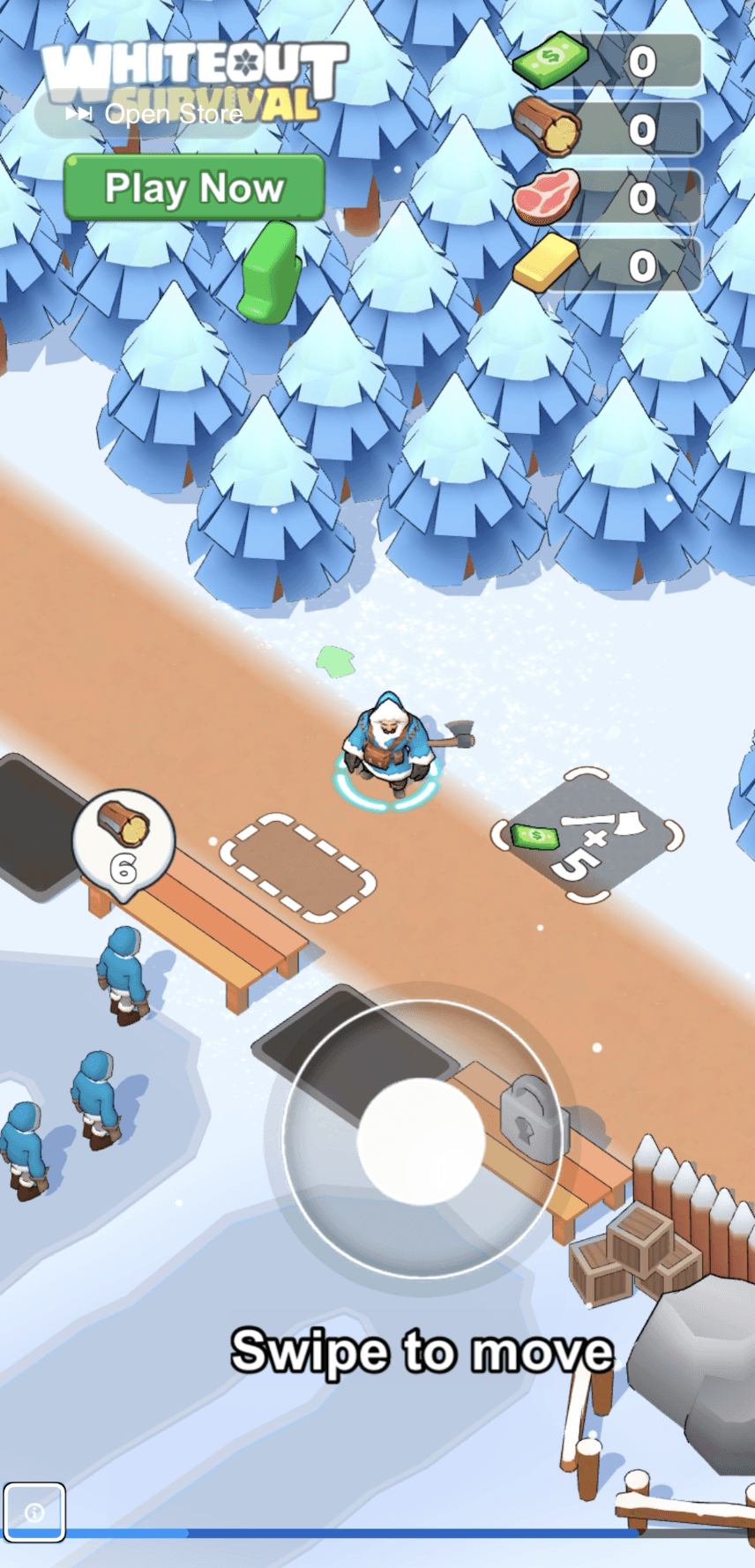
In most of the interstitial (full-screen) dynamic mobile advertisements displayed within third-party applications, the close button is excluded from the VoiceOver focus order or lacks an accessible name. VoiceOver reads internal ad elements (like loading percentages or looping between "Privacy" and "Open Store") but completely bypasses the exit point.



WCAG
Identified Failures
In interstitial (full-screen) dynamic mobile advertisements displayed within third-party applications, the close button is excluded from the VoiceOver focus order or lacks an accessible name. As observed in screen recordings, VoiceOver reads internal ad elements (like loading percentages or looping between "Privacy" and "Open Store") but completely bypasses the exit point.
No Keyboard Trap (Level A)
Screen reader users are trapped in a continuous focus loop. Swiping gestures only cycle through the ad's calls to action (e.g., "Swipe to move", "Play Now") without ever landing on a mechanism to close
Name, Role, Value (Level A)
Custom close buttons within the ad's view are not exposed to the iOS accessibility tree, preventing the screen reader from recognizing them as actionable UI elements.
WCAG 2.2 SC 2.2.1, 2.2.2, 3.2.4
Timing, Motion and Consistency (Level A and AA)
Countdowns hide the close control for a fixed time, banners swap content about every 30 seconds with no way to pause, and the close button moves between corners from ad to ad. Each one works against users with cognitive and attention disabilities.
WCAG 2.2 SC 1.2.2
Captions, Prerecorded (Level A)
Video ads that carry their message in sound play without captions, so Deaf and hard-of-hearing users see the motion but miss the point.
Impact
Affected Populations
5.5 percent of US adults have a vision disability, and a portion of those use a screen reader daily. That is a smaller share than the physical case. Cognitive disabilities are the largest group, at 13.9 percent of adults (CDC), and ads affect them through how they behave, not just how they’re coded.
The difference is deployment. The same ad SDK ships inside thousands of apps. A UCI study tested 500 ad screens across 100 apps and found 84.4 percent had at least one accessibility problem. 98.2 percent of AdMob native ads had unlabeled elements, and 92.7 percent of AppLovin full-screen ads had elements a screen reader couldn’t reach. The barrier is not one pad at one address. It is one defect copied everywhere the SDK is installed.
Users cannot locate the exit to return to their original app. In practical testing, escaping required extreme workarounds, such as pulling down the iOS Control Center to manually disable VoiceOver, or intentionally clicking the ad to open App Store overlay just to access a functional Apple-standard "Close" button.
Users relying on sequential switch navigation or Voice Control face the exact same programmatic barrier as screen reader users because the close button is not exposed as a selectable node.
Cognitive & Neurodivergent
A full-screen ad breaks into a task with no warning, so people with memory or attention disabilities lose their place. Countdowns hide the close control for a set time (WCAG 2.2.1), banner ads swap content about every 30 seconds (He et al., 2024; WCAG 2.2.2), and the close button moves between the top right and the bottom left from ad to ad, so there is no pattern to learn (WCAG 3.2.4). Cognition is the largest disability group in the U.S., at 13.9% of adults.
Deaf & Hard of Hearing
Video ads that carry their message in sound need captions (WCAG 1.2.2). Without them, a Deaf user sees the motion but not the point, and an ad that starts playing audio gives no visual cue that it can be muted. 6.2% of U.S. adults have a hearing disability.
What can be done
Potential Solutions
1
Ad SDKs must use standard native controls (e.g., UIButton on iOS) for close actions, programmed with explicit labels: accessibilityLabel = "Close advertisement".
2
Programmatically shift accessibility focus directly to the close button as soon as the minimum required ad display time elapses.
3
Ensure the close element is explicitly included in the accessibility tree (i.e., not excluded from the view hierarchy or masked by custom game-engine canvases).
4
Predictable, Calm Ads
No countdown before the close control appears, the close button in the same corner and size on every ad, a pause control on banners that refresh, and captions on every video ad.
Stakeholders
Disciplinary Perspective & Team Collaboration
UX & Front-End Engineering
Mandate consistent, high-contrast close button placement and visible timer countdowns across all ad component specifications.
Enforce Accessibility APIs in Ad SDK configurations so custom webviews accurately expose their nodes to native screen reader layers.
Monetization/Ad Operations
Establish accessibility compliance as a strict contractual requirement for third-party ad networks before integrating their SDKs.
Integrate manual VoiceOver regression testing for all ad formats before pushing updates to production.
What I can do
As a product designer, I advocate for transparent digital experiences rather than relying on deceptive interface patterns. While controlling third-party ad content isn't always feasible, I can deconstruct the user's focus flow, prototype accessible close actions, and standardize tap targets against WCAG guidelines in my designs.
Comparison
Synthesis & Comparative Analysis
Both scenarios were measured the same way: take a routine task, break it into steps, and check each step against a published figure. Put side by side, they fail for different reasons but in the same shape.
Synergies
1
The chair reaches the container. The screen reader reaches the ad. What's missing in both is the way to finish and leave.
2
The lid opens, but not from a seated position. The close button works, but not in the accessibility tree. Neither is missing. Both are conditional, and that's harder to spot.
3
The same people, both times
Both barriers lock out blind and low-vision users, people with limited hand movement, and people with cognitive disabilities. The dumpster also stops wheelchair and walker users; the ad also stops switch and Voice Control users. Cognition (13.9%) and mobility (12.2%) are the two largest disability groups in the U.S., and each case hits one of them hardest.
Differences
1
The building went up in 1962, before the ADA and before the Fair Housing Act design requirements, so no design rule reaches it. That explains the gap; it doesn’t excuse it, because the Fair Housing Act still lets a disabled tenant modify common areas, at their own cost. The ad shipped this year, and WCAG 2.1.2 and 4.1.2 have been Level A since WCAG 2.0 in 2008.
2
Physical: a level pad of about 40 sq ft costs roughly $160 to $480 at Austin rates of $4 to $12 per sq ft, before regrading and permits, and a lower container is a hauler swap on a $20 to $60 monthly rental. Digital: the code change is one label, but the app team doesn’t own that code. The ad arrives as a web view from Google, Meta or AppLovin, so the fix needs the vendor, a contract change, screen reader QA on every release, and possibly a new ad network. One accessibility lawsuit can cost up to $350,000 (NASCIO, 2025). The fix that looks free is the one that’s expensive to organize.
Summary
Both cases show that accessibility failures stack. At the dumpster, four measured conditions block wheelchair and walker users, the unmarked lot and a lid that drops shut work against blind residents, and a six-step task with no feedback strains people with cognitive disabilities. In the ad, one missing property traps screen reader and switch users, while countdowns, refreshing banners and a close button that moves from ad to ad work against people with cognitive disabilities. The costs aren’t what they first seem. The physical fix has a price: a few hundred dollars of concrete and a container swap. The digital fix is one line of code that no single team owns. In both, the way to finish the task exists, just not for the person in front of it.
Takeaways and what we can do
1. Measure before you argue. A 6-degree slope, a 47-inch lip and a close button VoiceOver never reaches turned “it’s hard” into something a landlord or a vendor can’t wave away.
2. Design for the largest group you can’t see. Cognition is the biggest disability group, at 13.9% of adults, and it showed up in both cases without being on the checklist I started with.
3. Price the fix, including who has to say yes. Concrete comes with a quote. The ad fix needs a vendor, a contract and QA. Cost lives in organizations, not just materials.
4. Property management: move the container to the flattest paving now, budget the level pad with the next resurfacing, and write door collection into the accommodation policy.
5. App teams and ad networks: add a screen reader pass to ad QA before every release, write ad accessibility into network contracts, and report failures to Google, Meta and AppLovin. Google Play already restricts disruptive ads; an unreachable close button belongs on that list.
6. Me, as a designer: document each barrier with measurements and screen recordings, so the person who holds the budget can see it.
References
Standards and law
U.S. Department of Justice. 2010 ADA Standards for Accessible Design. ada.gov
Sections used: 206.2.1 and 403.5.1 (accessible route), 302.1 (ground surfaces), 305.2 and 305.3 (clear floor space), 308.2 and 308.3 (reach ranges), 309.4 (operable parts), 403.3 (running and cross slope), 405.2 (ramp slope), 405.7 to 405.9 (landings, handrails, edge protection).Americans with Disabilities Act of 1990. Pub. L. 101-336.
Fair Housing Amendments Act of 1988, design and construction requirements. 24 CFR 100.205. See also HUD, Fair Housing Act Design Manual.
Fair Housing Act, reasonable modification provision. 42 U.S.C. § 3604(f)(3)(A). HUD and DOJ Joint Statement on Reasonable Modifications Under the Fair Housing Act (2008).
W3C. Web Content Accessibility Guidelines (WCAG) 2.0, 2.1 and 2.2. Criteria used: 1.2.2, 2.1.2, 2.2.1, 2.2.2, 3.2.4, 4.1.2. w3.org/TR/WCAG21/
Population data
Centers for Disease Control and Prevention. Disability Impacts All of Us infographic. cdc.gov/disability-and-health
Digital scenario
Apple. Human Interface Guidelines: Accessibility. developer.apple.com/design/human-interface-guidelines/accessibility
Apple Developer Documentation. UIAccessibility and accessibilityLabel. developer.apple.com/documentation/uikit/uiaccessibility
He, Z., Huq, S. F., and Malek, S. “I tend to view ads almost like a pestilence”: On the Accessibility of Mobile In-App Advertisements. International Conference on Software Engineering (ICSE), 2024. University of California, Irvine. seal.ics.uci.edu/publications/2024_ICSE_AdMole.pdf
Google Play. Better Ads Experiences and disruptive ads policy. support.google.com/googleplay/android-developer
Site information
Travis County Appraisal District. Property record, 1802 West Ave, Austin TX. traviscad.org
Centers for Disease Control and Prevention. Disability and Health Data System (DHDS), 2024 update. Cognition 13.9%, mobility 12.2%, independent living 7.7%, hearing 6.2%, vision 5.5% of U.S. adults.
Angi. How Much Does a Concrete Slab Cost in Austin, TX? angi.com, and Metal America Concrete, Concrete Slab in Austin, TX (2026). $4 to $12 per sq ft.
Dumpsters.com. How Much Does Commercial Dumpster Service Cost? Container rental $20 to $60 per month.
NASCIO. Beyond Compliance: The Economic Case for Digital Accessibility (September 2025). Lawsuit cost up to $350,000.